 info@hostingduty.com
 Call us at 02269718986


Gutenberg: A Comprehensive Guide to the WordPress Block Editor

Website building is evolving, and at the heart of this transformation is the Gutenberg Editor. But what exactly is Gutenberg? Introduced as a replacement for the Classic Editor in WordPress, Gutenberg revolutionizes content creation with a block-based system, making it more intuitive and flexible—without the hassle of shortcodes or additional page builders.
Whether you're crafting blog posts, landing pages, or full website layouts, the Gutenberg editor offers a seamless and user-friendly experience. It simplifies content management while allowing for advanced design customization, making it a must-have tool for WordPress users.
Table of Contents
- Why Upgrade to the Gutenberg Editor?
- What is the Gutenberg Editor in WordPress?
- Key Features of Gutenberg Editor
- Gutenberg vs. Classic Editor: What’s the Difference?
- Essential WordPress Plugins for Enhancing Gutenberg
- The Future of the Gutenberg Editor
- Frequently Asked Questions (FAQ)
Why Upgrade to the Gutenberg Editor?
If you've used WordPress before, you're familiar with its traditional editor, which allows for text and media formatting. While this editor is simple and beginner-friendly, it lacks the flexibility required for modern web design.
Competing platforms like Squarespace, Wix, and Medium have pushed WordPress to innovate, leading to the release of the Gutenberg editor in December 2018. Since then, WordPress has continuously enhanced Gutenberg, with version 20.0 launching in January 2025—marking its 200th iteration.
Gutenberg is now an essential part of WordPress, offering a more powerful and flexible editing experience. If you haven’t explored it yet, now is the time to leverage its full potential.
What is the Gutenberg Editor in WordPress?
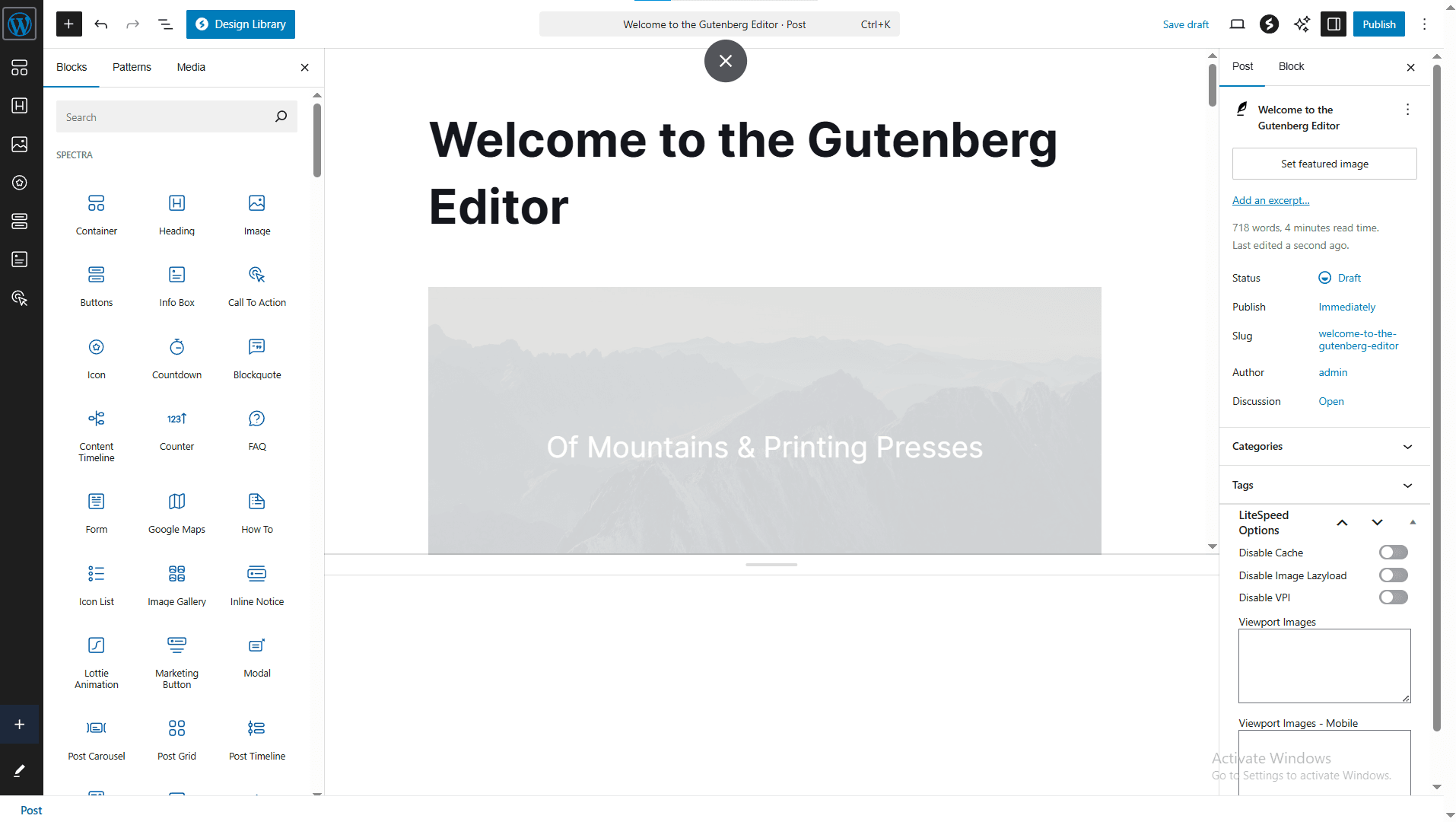
Gutenberg was designed to modernize content creation within WordPress. Unlike the Classic Editor, which relies on a single text field and manual HTML formatting, Gutenberg introduces a block-based approach, where each element—text, images, videos, buttons—is its own block.
This system provides a drag-and-drop experience similar to page builders, making it easier for users to create visually appealing pages without coding knowledge.
Key Features of Gutenberg Editor
- Block-Based Editing – Organize content efficiently using blocks for text, images, videos, and more.
- Drag-and-Drop Functionality – Easily rearrange blocks to structure your content.
- Pre-Designed Block Patterns – Use ready-made layouts without additional design tools.
- Reusable Blocks – Save and reuse custom blocks across multiple pages and posts.
- Full-Site Editing (FSE) – Modify headers, footers, and templates directly within the editor.
- Live Preview – Instantly see how your content will appear when published.
- Advanced Typography & Design Controls – Customize font styles, colors, and spacing with ease.
- Easy Media Embedding – Integrate videos, images, and social media content effortlessly.
- Performance Optimization – Generates clean HTML for faster page loading and better SEO.
- Accessibility Features – Supports keyboard navigation and screen readers for inclusivity.
With these tools, Gutenberg simplifies content creation while allowing for greater design flexibility—ideal for both beginners and advanced users.
Gutenberg vs. Classic Editor: What’s the Difference?
| Feature | Gutenberg Editor | Classic Editor |
|---|---|---|
| Editing Approach | Block-based content editing | Single text field |
| Customization | Pre-designed patterns & reusable blocks | Limited customization |
| User Experience | Drag-and-drop interface | Manual formatting required |
| Media Handling | Seamless embedding | Manual insertion |
| Full-Site Editing (FSE) | Customization of headers, footers, and templates | Limited to post/page content |
| Performance | Optimized code for speed & SEO | May require plugins for performance |
| Learning Curve | New users need adaptation but gain more flexibility | Familiar for older users but lacks modern features |
Gutenberg eliminates the need for shortcodes, manual HTML, and extra plugins, making it the preferred choice for modern WordPress users.
Essential WordPress Plugins for Enhancing Gutenberg
- Spectra – Adds advanced design elements like testimonials, pricing tables, and multi-buttons.
- Kadence Blocks – Offers enhanced layouts, galleries, and interactive elements.
- Stackable – Provides a library of pre-designed UI blocks for professional page building.
- CoBlocks – Introduces dynamic blocks such as accordions, galleries, and typography controls.
- EditorsKit – Enhances text formatting and provides visibility controls for better editorial workflow.
The Future of the Gutenberg Editor
WordPress is continuously improving Gutenberg, with upcoming features focusing on AI-powered enhancements, real-time collaboration, and deeper integration with full-site editing. The goal is to make website building even more accessible while maintaining the flexibility and control that WordPress is known for.
If you haven’t yet explored the Gutenberg editor, now is the perfect time to start. Whether you're a blogger, business owner, or developer, Gutenberg is designed to make content creation faster, easier, and more visually engaging.
Ready to enhance your WordPress experience? Start using Gutenberg today!
Frequently Asked Questions (FAQ)
1. Is Gutenberg free to use?
Yes, Gutenberg is a free and built-in editor for WordPress. No additional cost or plugin installation is required.
2. Can I switch back to the Classic Editor?
Yes, you can install the "Classic Editor" plugin if you prefer the old editing experience. However, support for it may eventually be discontinued.
3. Is Gutenberg compatible with all WordPress themes?
Most modern WordPress themes are fully compatible with Gutenberg. However, some older themes may require updates to take full advantage of its features.
4. Does Gutenberg work with all plugins?
Most plugins work seamlessly with Gutenberg, but if a plugin relies on the Classic Editor, you may encounter compatibility issues. Check for updates or Gutenberg-friendly alternatives.
5. Can I use Gutenberg for full-site editing?
Yes! The latest versions of Gutenberg allow for full-site editing (FSE), letting you customize headers, footers, and templates directly within the editor.
6. Do I need coding skills to use Gutenberg?
No, Gutenberg is designed for users of all skill levels. However, developers can extend its functionality with custom blocks and styling.
7. How does Gutenberg improve SEO?
Gutenberg generates cleaner and more structured HTML, which helps improve site performance and SEO rankings.